8 Winning Strategies to Make the Most Out Of Your Organic Reach Through Facebook Live
Facebook Live is the ultimate game-changer for businesses looking to connect with their audience dynamically and captivatingly. Imagine being able to showcase your products in action, answer customers’ questions in real-time, and provide an exclusive peek behind the scenes of your brand. With Facebook Live, you can do all that and more. It’s an innovative and powerful way to build trust and loyalty and drive sales. So if you’re a startup business owner or a marketer, don’t miss the opportunity to leverage Facebook Live and stay ahead of the competition in the digital world.
This article will walk you through everything related to it, making it possible for you to reap its benefits.
Understanding the Power of Facebook Live
Live videos are highly engaging, leaving regular videos far behind sometimes. Facebook recognizes this and favors them over regular videos, giving your content a better chance of being seen by your target audience. In addition, with how Facebook’s algorithm works, live videos are automatically recommended to viewers with similar interests, making it a smart choice for businesses looking to boost engagement and reach a wider audience.
It’s like a live wire connection, raw and unfiltered. Unlike pre-recorded videos, with live videos, you can’t pause, rewind, or edit. It’s an authentic visual experience that allows your audience to feel like they’re right there with you. It’s a one-of-a-kind opportunity to connect with your audience and leave a lasting impact.
Some mind-blowing Facebook Live stats

- According to a study by Livestream, Facebook Live videos receive 10 times more comments than regular videos.
- In another study by Facebook, people spent 3x longer watching live videos than recorded videos.
- Live videos on the platform receive three times more views than pre-recorded videos. (Source: Facebook’s Creator Studio, 2018)
- Another study found that people comment 10 times more on live videos than pre-recorded videos. (Source: Facebook’s Creator Studio, 2018)
- A survey by Livestream found that 80% of users would rather watch a live video from a brand than read a blog post. (Source: Livestream, 2016)
- According to a study by Social Media Today, live videos on Facebook receive an average of six times more engagement than pre-recorded videos. (Source: Social Media Today, 2017)
8 Winning Strategies To Get You Started
Now that you have realized that Facebook live video is crucial when promoting a small business, it’s high time you created a roadmap to go about it. Opting for Facebook live videos is one of the most potent marketing tips for a small business. The catch is that when Facebook realizes that the live video is ready to stream, it instantly sends notifications to the fans. This augments their chances of running toward the video to watch them as soon as they know it.
Initiating live videos is one of the most creative marketing ideas to spark conversions and bring the audience to your Facebook page. Engagement increases as anyone joining the live video can comment and ask a query.
If you have been a part of some live videos on Facebook, especially the ones started by a celebrity, you must have seen hundreds of people commenting on the video. They can ask whatever they want and share whatever they deem fit. This participation is also why people prefer watching and being a part of Facebook live videos over pre-recorded ones.
Conduct audience research to understand interests & preferences
Your Facebook live video needs maximum reach, so you must conduct extensive audience research. Then, if you know about the audience, you can create a video that aligns with their interests and preferences.
Now, think about it: While switching through the channels on the TV and going from one channel to the other, would you stay at the one that doesn’t interest you for more than a few seconds? Well, you definitely won’t. The same goes for the content you use for your Facebook live video. If things you discuss or talk about don’t match the interests and preferences of your audience, you will see few of them staying to listen to you. Hence, conducting audience research to understand their interests and preferences is crucial. This way, it would get possible for you to offer them precisely what they want.
You can learn about the audience on Facebook through Facebook Audience Insights. This lets you know about two kinds of audiences, those on Facebook in general and those interested in your page and connected to it. Knowing about these varied groups of audiences aids you in creating videos that would engage those already on your page and entice those whom you consider your potential viewers.
Facebook Audience Insights: a tool for analyzing audience demographics
The demographic overview of the audience lets you have all the details precisely. You get to know about everything from their gender to their education and from their relationship statuses to the kinds of jobs they do. The location of viewers through the demographic profile also lets you know about the possibilities of them turning into your potential consumers. If they are nearby, there are great chances they will try your small business. However, for those who reside at some farther geographical location, their chances of turning into your direct consumer may be weak, but they could surely recommend your business to others.
The relationship status of the audience also helps you know more about them. For instance, if your business is more about serving married people than single ones, the demographic profile will let you know whether you can have meaningful conversions through the live video.
Age and gender are elements of the audience research activity that will help you predict whether the engagement would lead to actual conversions. For example, imagine you have a small business dedicated to women’s accessories, but your audience research showcases men to be a part of the page. Do you think the chances of conversions would be high?
Planning for success: a checklist of items to consider before streaming
Before you decide to go live, you need to be well prepared. It has a bad effect on the audience when you go live on Facebook, but the internet on your side keeps interrupting the video. So there are high chances your audience might not return to check out your video once you start it again.
The most significant benefit of live videos is that they help the audience interact with your directly. They can make comments and ask queries in real-time. At the same time, they can connect and interact with all the other viewers who are watching the video live. Eventually, this leads to a strong community that emerges from the video, creating a solid bond among the audience and between the brand and the viewer.
This is why you need to have a checklist of items that you need to consider before starting the live stream.
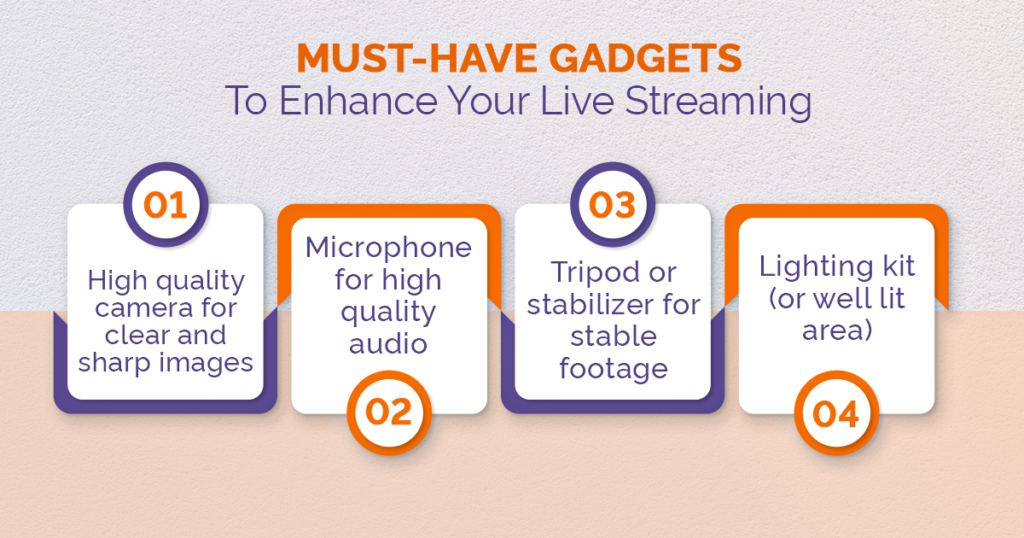
4 must-have gadgets for an amazing live-streaming experience
a. Choose an appropriate gadget
This goes without saying that you need an appropriate gadget to start the live video and host it for the audience. You can either go for a smartphone or a laptop for this purpose. Having a laptop would offer you much convenience. It would also ensure that your video appears stable and the environment looks controlled. Your laptop needs a built-in webcam and appropriate specs, preferably 8GB RAM and an Intel i7 processor.
This also depends on the kind of aura you want to exude through the video. If you want a laid-back approach, a smartphone would be an excellent choice to make the video.
b. Invest in an external camera
Now, what’s the need for an additional camera when you already have a camera in the gadget being used? An additional camera is a great choice to make when you want to stream to a large audience.
If your small business has even a tech-savvy person on the team, making the camera work will be easy for him. This super-small effort would result in a good quality and uninterrupted live-stream video with a polished look.
c. Be audible
Though we have been talking about the ‘video’ all this time, it’s obvious that the ‘audio’ also needs to be really impressive! If you appear to be talking in the video, but the audience can’t hear you, they won’t sit through it.
This is why it’s significant that you invest in a good-quality microphone. This small gadget will ensure you are audible in the video without making the sound echo through space. In addition, adding an audio mixer to the gadget collection will enhance each viewer’s experience, irrespective of location.
d. Don’t compromise on the internet quality
No one likes a video that gets interrupted time and again. As a matter of fact, you need to ensure that your internet connection is super reliable and doesn’t ditch you at the last moment. To be on the safer side, it’s a great idea to go for live-streaming Ethernet. You will get all of it with no other gadget to connect and work. This comes with a better output than a wireless connection, as it can’t be shared!
Maximize your reach: how to promote your live streams
Your small business needs creative marketing ideas to get maximum reach online. It’s not always possible to get your required number of conversions.
If you plan to initiate a live stream on Facebook one day and not make your audience aware of it, you won’t get many views. Reason? No one knew about it. Obviously, not everyone has an active internet connection 24/7 to get the notification of your live video and get online to view it instantly!
Hence, you must announce the live stream date at least 48 hours before going live. Alongside this, connect various other social media platforms with it and announce the big news there.
When the video goes live, you must create and post highlight clips to engage the audience further.
Leverage analytics and insights to optimize your future streams
Once you finish the live video and it has ended, you can check out the analytics and evaluate its success rate. This way, you could manage future streams to bring better engagement.
Use Facebook Creator Studio as your social media management tool
Facebook Creator Studio is a tool that allows page administrators and creators to manage and measure the performance of their content on Facebook. You can find insights and metrics on your page’s engagement, audience demographics, and reach. They also have a section for “Live” where you can see metrics such as views, comments, likes, etc., that could give you more idea about the performance of your live videos on the platform.
Pick the right time and day
Picking up the right time and day for your live video is crucial. You can’t expect your video to have views if you start it on a Monday morning!
Being a startup founder, you may be enthusiastic about letting the audience know about you and your business. However, the same doesn’t go for the viewers. Timing is everything and will decide whether you get the right audience for your live video. To enhance your organic reach, you need to be mindful of when you choose to go live.
According to the algorithm, Tuesdays and Thursdays are the best days to go live. You can go live at any time from 1 pm to 3 pm, and you would be able to drive maximum viewers to the video.
Compared to the videos that go live right at the start of the week or when it ends, those in the mid get the most views and clicks. Saturday evenings are lazy times for a lot of people. You may also see a lot of views at that time; however, clicks are not sure.
While choosing the best time to go live, make sure you consider the time zone as well. For the particular location you want the audience from, make the videos when the audience from that space is mostly active on social media platforms.
Your viewers may be youngsters who prefer watching a Netflix show over your live video! Keep that in consideration as well!
Having said all this, it’s also true that you need to do extensive testing before going for the actual live streaming. For that matter, you have to make sure that you make testing a part of your overall live-streaming plan. Take a few months to see the varying levels of engagement you get, depending on the time and days of the week you live stream. Perform the tests considering various aspects of the video, and it will let you know when to host the live video. Once you have tried varied slots for the live video, you can see what works for you and what doesn’t!
Utilize hashtags and crossposting
Using trending hashtags helps small business owners get the most views and clicks. As a matter of fact, trending hashtags help potential customers turn into long-term consumers, provided they use the tags smartly.
Crossposting also has a great potential to help live videos become trending. Crossposting refers to the posting of the video on various pages on Facebook. However, there is a need to initiate a video crossposting relation with all the pages on which you intend to post the video. If you already have that relationship, you don’t need to take any additional steps.
The process is really simple. It requires you to Select the Go live card on the given Live producer options and then choose click distribution. Here, you will see the option Crosspost that you can opt for. Next, you must select the pages you need to crosspost the video.
Leverage your community with call-outs
Call-outs are yet another great way to make the community wider and stronger. Online engagement tools such as call-out broadcasts are top-notch since they can be shared even after the event has ended, owing to the fact that they are usually produced in advance.
Let the viewers know that if they want to get more information, schedule an appointment, or place an order, they can use call ads to get people to contact your business.
It is one of the best ways to enhance the sales of a new business despite the fact that it is currently small in scope. The call-outs make sure to bring more conversions and provide great returns.
There’s No Reason Not To Give It A Try.
Going live on Facebook videos comes with a plethora of benefits. Still, the most prominent one is that you can build relationships and increase exposure with your audience in real time with live streaming. The Facebook Live Video feature lets small business owners engage with the audience in real-time, building trust and loyalty because consumers can interact with even each other and have a stronger connection than being anonymous users of the company’s products or services.
Consumers and potential consumers can help entrepreneurs determine what products and services are in demand to provide them with the types of products and services they want. So you see, the Facebook video also plays a great role in informing the business owner about the needs and requirements of potential customers.
Compared to regular videos, real-time interaction through live videos have the ability to bring more viewers. This is also because live video content has a great visual appeal, and an easy digestibility rate makes it memorable.
So, what are you waiting for? If you are a small business owner who has just started your business and wants more people to know about you, initiating a live video will surely be a great idea. Moreover, as Facebook is a free platform compared to most other marketing strategies, this doesn’t cost a penny. Hence, it should definitely be tried, keeping all the above-mentioned winning strategies to engage more audience in mind!
Also, who doesn’t like attracting an audience without paying for it? Facebook live is surely a magical feature of this social media platform and can transform the fate of your business if it works in your favor.
